Do you want to display your Instagram image feeds on your WordPress websites? If so. Then you are in the right place. In this blog, I have listed the six best free WordPress Instagram plugins that you can use to display photos from your Instagram to your WordPress websites.
You can also use these plugins to create an Instagram slider and add the Instagram icon with a link to your business or personal Instagram profile. You can also use social sharing plugins to add other social media icons on your WordPress Website or blog.
So, without wasting more time, let’s start the list.
1. Smash Balloon Social Photo Feed
It is one of the most famous and advanced Instagram plugins for WordPress websites. This plugin allows you to display Instagram posts from your Instagram account to your WordPress Blog or website.
With the help of this plugin, you can display your Instagram feed in multiple awesome layouts. It also allows you to display photos from multiple Instagram accounts in the same feed or a separate feed.
This plugin gives you lots of options to display photos on your website, such as changing the height and width of the photos and the number of images you want to display. It is 100 % responsive and looks great on all mobile devices.
2. Social Slider Widget
Social Slider Widget is also a very popular plugin for WordPress websites that displays Instagram feeds. This plugin allows you to display the Instagram feed in Widgets, pages, or posts by using simple shortcodes.
This plugin allows you to display your Instagram feed in a slider and thumbnail to improve the visuals on your WordPress websites. It is 100% responsive, which means it will look great on all mobile devices. The Social Slider widget works well with all modern web browsers.
This plugin offers flexible layout settings and allows you to customize the size, number of Images, and image spacing.
3. Feed Them Social

It is one of the most advanced plugins for displaying Instagram feeds on your WordPress websites. With the help of this plugin, you can create responsive social feeds for your Twitter, Instagram, Pinterest, and YouTube.
It is super easy to install and set up. This plugin allows you to display as many social feeds as you want. With the help of this plugin, you can display Facebook, Instagram, Twitter, YouTube, and Pinterest feeds on your WordPress websites.
This plugin has Free and Premium versions. The premium version offers some additional features for displaying Social media feeds.
5. Social Feed Gallery
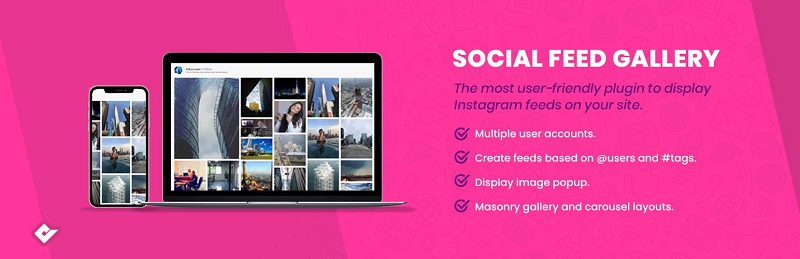
Social Feed Gallery is an easy-to-use and simple Instagram feed plugin for WordPress websites and blogs. With the help of this plugin, you can easily integrate Instagram feeds into your WordPress websites. It provides a great user experience to your website visitors.
This plugin is super easy to use and set up. With the help of this plugin, you can display Instagram feeds from multiple profiles. It is highly customizable, which means you can easily customize the positioning and the appearance of your Instagram feed based on your design needs and preferences.
This plugin also comes in free and premium versions. The free version offers some additional features for displaying and managing Instagram feeds on your WordPress websites and blogs.
6. Spotlight Social Media Feeds
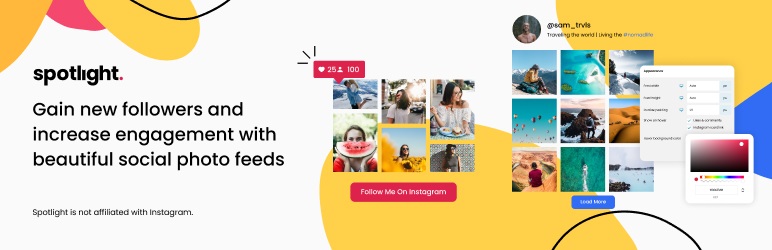
If you are looking for an easy-to-use social media feeds plugin, then you can use this. It allows you to display an Instagram feed on your website and blog. It is super easy to set up and highly customizable, which means you can easily customize the design based on your preferences and needs.
This plugin allows you to connect multiple Instagram profiles and set the number of posts and columns per device. It is 100% responsive and compatible with the new WordPress Gutenberg editor.
FAQ’s
1. What are Instagram feed Plugins for WordPress?
WordPress Instagram feeds plugins enable you to showcase your Instagram pictures and videos on your site. They assist in bridging the gap between your social media and your site, making it more attractive and interesting to visitors and automatically presenting your latest posts.
2. Why should I add Instagram feeds to my website?
Instagram feeds are also useful in boosting user activity as well as in updating your site content. It also creates trust through displaying social proof as it is happening and invites visitors to subscribe to your Instagram profile, which allows you to increase your audience and brand presence on the Internet.
3. Are free Instagram plugins good enough for beginners?
Yes, free Instagram plugins are good to start with. They come with such basic features as feed display, customization, and responsiveness. These are free to install and operate, and are therefore suitable for bloggers and small businesses who do not want to spend money on making their site better.
4. Can I customize Instagram feeds on my WordPress website?
The vast majority of Instagram plugins can be customized. You have a chance to change layouts, colors, the size of images and the number of posts to be shown. This will assist you in aligning the Instagram feed with your web design and produce a consistent and professional appearance for your visitors.
5. Do Instagram feed plugins
Instagram feeds are a good idea to increase the level of engagement, which is good in terms of SEO. They retain users longer on your site and introduce dynamism. However, it’s important to choose optimized plugins to avoid slowing down your website and maintain good performance.
Conclusion: Free WordPress Instagram Plugins
So, that’s all from this blog. I hope you enjoyed the list of the six best free WordPress Instagram plugins. If you liked this article, then don’t forget to share it with your friends and Twitter followers. Adding Instagram feeds to your WordPress website is a smart way to boost engagement and keep your content fresh. These plugins not only enhance your website’s design but also help build trust by showing real-time social proof.
As a blogger, business owner, or content creator, you can use Instagram feeds. This helps boost visibility and attract more visitors. Using the right audience engagement tools, like customizable plugins, helps you enhance layouts. This boosts user experience. It also helps you connect more with your audience on social media. Begin using them today to make your site more interactive and engaging.